|
Notes |
|
|
(0019406)
|
|
Ken Moreland
|
|
2010-02-01 11:54
|
|
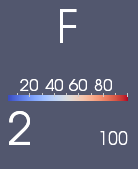
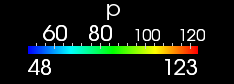
I don't really consider this a bug. This is an effect of the scalar bar trying to fit readable labels when you set the font size too big and make the scalar bar too small.
The scalar bar tries its best to fit the labels given the requested font size. It adjusts the precision of the numbers displayed to best fit within the space allotted. If you have made the scalar bar way to small to fit anything within the space and there is no way to represent the number even with reduced accuracy, then as a last resort the font size for a given label is reduced so that it fits. It is this last resort that you are forcing in these screen shots.
I do not think any of the alternatives are better. If you leave the font size as it is, the labels with write over each other and become unreadable. If you size all the fonts down, then all your labels will start shrinking because one does not fit, which can be very confusing behavior. |
|
|
|
(0019414)
|
|
Burlen
|
|
2010-02-01 14:38
|
|
Sure, PV does the right thing and shrinks the font if you make the scalar bar smaller. But, all of the labels should then use the same smaller font size.
I don't find that confusing. you shrink the scalar bar, the font shrink as well. If they are all the same size it looks fine and the user can make the scalarbar what ever size they need.
no one else complained so perhaps its my expectations that need tweaking :)
|
|
|
|
(0037770)
|
|
Kitware Robot
|
|
2016-08-12 09:57
|
|
Resolving issue as `moved`.
This issue tracker is no longer used. Further discussion of this issue may take place in the current ParaView Issues page linked in the banner at the top of this page. |
|
 scalarbar_font_1.png (3,248) 2010-02-01 11:43