| View Issue Details [ Jump to Notes ] | [ Print ] | ||||||||
| ID | Project | Category | View Status | Date Submitted | Last Update | ||||
| 0011107 | ParaView | Feature | public | 2010-08-10 19:03 | 2010-08-11 16:00 | ||||
| Reporter | Alan Scott | ||||||||
| Assigned To | Ken Moreland | ||||||||
| Priority | normal | Severity | minor | Reproducibility | always | ||||
| Status | closed | Resolution | won't fix | ||||||
| Platform | OS | OS Version | |||||||
| Product Version | |||||||||
| Target Version | 3.10 | Fixed in Version | |||||||
| Summary | 0011107: Color scale font layout could be improved | ||||||||
| Description | I have a user that has made complaints about font layout on the color scale editor. After looking at it, I think he has a seed of truth to his complaint. I will post his comments at the end of this report, but realize that he is thinking if terms of data precision - not character spaces. Thus, here is my proposal. Use case: ParaView trunk, local server, Windows. Open disk_out_ref.exo. Calculator. Use GlobalNodeId*1e6-1e6+1.2345678 in the formula. * Bug - we only get one digit of precision when using scientific notation, but 3 on the exponent. A problem is that this always gives a maximum that is repeated somewhere down the color scale. Example - 8e+009 * Solution - what I want - lets try using something like %-#6.2g, giving at least 2 digits of precision when using exponents. Example - 8.5e+009, or better yet, 8.5e+09. Furthermore, we would now get the same number of digits of precision for the min and max - i.e., 1.2 to 8.5e+09. * Bug - when you turn "Automatic Label Format" off, everything jumps - due to a different output format being used. * Solution - The "default" for auto formatting off should be the same as auto formatting on. * Bug - min number and max number font size should always be the same size. * Example - change the font size to 18. No matter what the user asks for, use the closest to requested size that is usable for min and max. * Another possible bug - I have seen cases where the font size through the numbers for the ticks is different size. We should figure out ONE font size that will work for all ticks, and use that. Note that I could not replicate with a vertical color legend. | ||||||||
| Tags | No tags attached. | ||||||||
| Project | |||||||||
| Topic Name | |||||||||
| Type | |||||||||
| Attached Files | 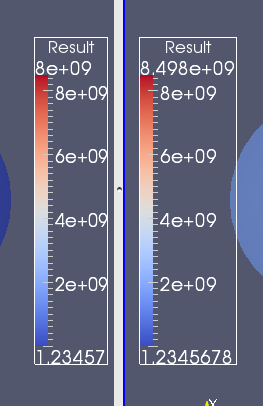 ColorScaleWidths.png [^] (15,621 bytes) 2010-08-11 11:03 ColorScaleWidths.png [^] (15,621 bytes) 2010-08-11 11:03
| ||||||||
| Relationships | ||||||
|
||||||
| Relationships |
| Notes | |
|
(0021714) Ken Moreland (manager) 2010-08-11 11:33 |
I am pushing back and recommending that none of these changes be made. This behavior is all by design and caused only because you have a color scale widget that is too narrow to show large fonts or much precision. Take a look at the ColorScaleWidths.png image I attached. The left widget shows most of the "issues" brought up by this bug. The right shows that by just making the widget a little bit wider all the issues get resolved. More specifically, addressing all the bullets in the report: * The widget will use one digit for scientific notation only when that is all that will fit. If you make the widget wide enough to show more precision, it will. * I see little point in forcing the precision in the min and max values. They currently both show as much precision as possible, and throttling one because of the other seems less right to me. I suppose you could force the precision in the min/max to be at least two significant digits, but that exacerbates font sizing issues and does not really help in all cases. * Of course things jump when you turn off Automatic Label Format. It goes from adjusting the format for each label to a fixed label that is general and predefined. Perhaps this bug report is suggesting that the format shown in the color scale editor follow that of the labels, but that is not possible. The color scale editor is not expressive enough to capture the format of all labels. Implementing this would significantly complicate both the code and the GUI, and I see little point in doing it. * The min/max font size being different as well as the tick label font size being different is covered by bug 0010219. * The color scale will always scale down fonts that are too big to fit within the bounds of the widget. Thus, it is expected that bigger and bigger font sizes will eventually show no effect. Again to reiterate, the automatic formatting already fixes all these problems for you if you simply make the color scale a little wider so that it can fit the precision and font sizes. Perhaps it would help if the default color scale was wider and/or the default font size was smaller. If that is desired, submit a new bug report with a concise description and motivation. |
|
(0021717) Alan Scott (manager) 2010-08-11 16:00 |
I am closing this issue, and replacing it with more detailed bug reports and fix requests - as bug number 11115 and 11117. |
| Notes |
| Issue History | |||
| Date Modified | Username | Field | Change |
| 2010-08-10 19:03 | Alan Scott | New Issue | |
| 2010-08-10 19:04 | Alan Scott | Relationship added | parent of 0010219 |
| 2010-08-11 11:03 | Ken Moreland | File Added: ColorScaleWidths.png | |
| 2010-08-11 11:33 | Ken Moreland | Note Added: 0021714 | |
| 2010-08-11 11:33 | Ken Moreland | Status | backlog => @80@ |
| 2010-08-11 11:33 | Ken Moreland | Resolution | open => won't fix |
| 2010-08-11 11:33 | Ken Moreland | Assigned To | => Ken Moreland |
| 2010-08-11 16:00 | Alan Scott | Note Added: 0021717 | |
| 2010-08-11 16:00 | Alan Scott | Status | @80@ => closed |
| 2011-06-16 13:10 | Zack Galbreath | Category | Feature Request => Feature |
| Issue History |
| Copyright © 2000 - 2018 MantisBT Team |