| View Issue Details [ Jump to Notes ] | [ Print ] | ||||||||
| ID | Project | Category | View Status | Date Submitted | Last Update | ||||
| 0004368 | ParaView | (No Category) | public | 2007-01-25 16:33 | 2016-08-12 09:57 | ||||
| Reporter | Kent Eschenberg | ||||||||
| Assigned To | Berk Geveci | ||||||||
| Priority | high | Severity | major | Reproducibility | always | ||||
| Status | closed | Resolution | moved | ||||||
| Platform | OS | OS Version | |||||||
| Product Version | |||||||||
| Target Version | Fixed in Version | ||||||||
| Summary | 0004368: Z Buffer Problem in Client-Server | ||||||||
| Description | The classic Z buffer alias problem seems to occur when running in client-server mode under some conditions. By that I mean that odd-shaped pieces of the near surface will be replaced by far surfaces, at certain view angles. Running paraview 2.4.4 pvserver and pvclient (with -rc) on the same workstation (Fedora Core 5, Pentium 4) produces the attached image serverGL.gif from the window displayed by the server. The image in the client is the same. The result is more dramatic when seen interactively - dozens of small dark patches (the far surface) will flicker on and off as the object is rotated. Over certain ranges of angles no problem at all is seen. The same arrangement using Mesa 6.5.2 for both client and server produces the attached images serverMesa.gif and clientMesa.gif. Now, huge chunks in the center flicker during rotation. This shows an additional problem where the image is broken into streaks. Using Mesa for the server and OpenGL for the client results in both showing images like clientMesa.gif. This was the situation where the problem was first seen except that the server was a remote 64-bit parallel system. I downloaded a fresh copy of 2.4.4 to ensure I was not using any of our local modifications. The Z buffer problem goes away when composite is off; when orthogonal projection is used; or when lines (such as the center of rotation crosshairs or orientation axes) are also being displayed. The attached file zbexample.vtk used for these images is one piece of a large set of files in the pvd format that exhibits the same problem. I've done many checks, looking for duplicate triangles etc., and haven't found any problems. | ||||||||
| Tags | No tags attached. | ||||||||
| Project | |||||||||
| Topic Name | |||||||||
| Type | |||||||||
| Attached Files | 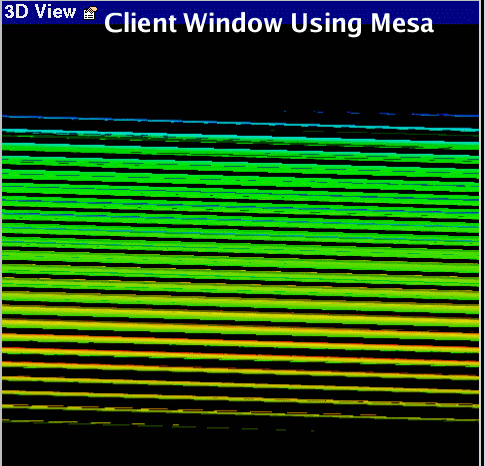 clientMesa.gif [^] (53,441 bytes) 1969-12-31 19:00 clientMesa.gif [^] (53,441 bytes) 1969-12-31 19:00
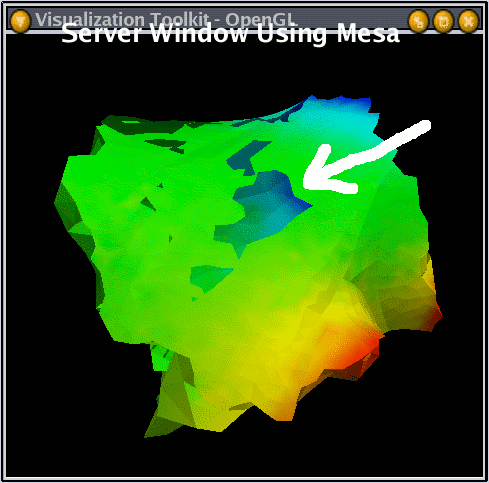 serverMesa.gif [^] (52,076 bytes) 1969-12-31 19:00 serverMesa.gif [^] (52,076 bytes) 1969-12-31 19:00
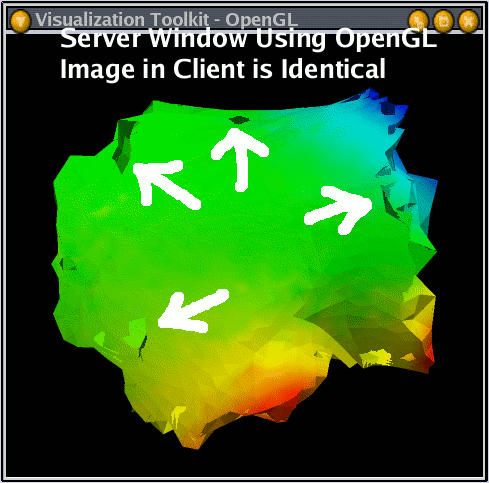 serverGL.gif [^] (57,075 bytes) 1969-12-31 19:00 serverGL.gif [^] (57,075 bytes) 1969-12-31 19:00
 zbexample.vtk [^] (56,371 bytes) 1969-12-31 19:00 zbexample.vtk [^] (56,371 bytes) 1969-12-31 19:00 | ||||||||
| Relationships | |
| Relationships |
| Notes | |
|
(0006265) Kent Eschenberg (reporter) 2007-01-25 16:50 |
A typo: "Using Mesa for the server and OpenGL for the client results in both showing images like clientMesa.gif" should read "... like serverMesa.gif". |
|
(0006267) Kent Eschenberg (reporter) 2007-01-25 16:57 |
I should add that the supplied VTK file contains triangles that enclose a volume about 2 units on a side but displaced from the origin by 80 to 200. Maybe such a combination is fooling the Z buffer setup in client-server mode? Adding a few lines, or rendering locally (i.e., composite off) cures it. |
|
(0006584) Kent Eschenberg (reporter) 2007-02-28 11:59 |
What seems to be the same problem can be seen when the server runs on a second system (64-bit Redhat Enterprise, PV 2.4.4). Don't bother with my example VTK file - just create a sphere. Then zoom in so the sphere is behind you; zoom out till it is a dot; then zoom back to the original scale. The Z-buffer like problem can be seen. The conditions must otherwise be as described in the orginal post. This might be related to two other problems observered in client-server mode. First, using the mouse to set the center-of-rotation point always puts the point between the picked object and the viewer - that is, the Z is wrong. Second, zooming with the right mouse button goes faster and faster after one zooms in and out. This could also be related to faulty values for the object Z dimensions. Neither problem is seen with composition off. |
|
(0006840) Kent Eschenberg (reporter) 2007-03-19 14:19 |
Problem has been reproduced with 2.6.0 on Tru64. |
|
(0009780) Kent Eschenberg (reporter) 2007-11-28 16:55 |
Reproduced using 3.2.1 and Mesa 7.0.1. |
|
(0009993) Kent Eschenberg (reporter) 2007-12-18 15:35 |
Fixed by Ken Moreland. I think he checked in the fix but cannot confirm this. The problem was that the near/far clip planes were set to the most extreme values eever encountered since ParaView was started. The fix was to use the current near/far values. Before the fix the near/far planes could be set far outside the actual image resulting in aliasing in Z. This was only seen in client-server mode, and the fix was in server code. I guess the standalone mode does it differently. That would be good to check. |
|
(0037509) Kitware Robot (administrator) 2016-08-12 09:57 |
Resolving issue as `moved`. This issue tracker is no longer used. Further discussion of this issue may take place in the current ParaView Issues page linked in the banner at the top of this page. |
| Notes |
| Issue History | |||
| Date Modified | Username | Field | Change |
| 2007-11-28 16:55 | Kent Eschenberg | Note Added: 0009780 | |
| 2007-12-18 15:35 | Kent Eschenberg | Note Added: 0009993 | |
| 2009-12-09 14:49 | Berk Geveci | Project | @3@ => ParaView |
| 2011-06-16 13:10 | Zack Galbreath | Category | => (No Category) |
| 2016-08-12 09:57 | Kitware Robot | Note Added: 0037509 | |
| 2016-08-12 09:57 | Kitware Robot | Status | expired => closed |
| 2016-08-12 09:57 | Kitware Robot | Resolution | open => moved |
| Issue History |
| Copyright © 2000 - 2018 MantisBT Team |